
12 Best AI Tools for Content Creation That Actually Beat ChatGPT in 2026
ChatGPT for Content Creation: 12 Best AI Tools & Workflows in 2026
According to postiv.ai (single-source, unverified), 44% of marketers use ChatGPT for content creation – the largest adoption share of any AI writing tool in 2026. Adoption and performance are not the same thing.
Specialized tools outperform ChatGPT in specific use cases: long-form nuance, SEO scoring, cited research. This guide is for people who’ve already tried ChatGPT and want to know what else belongs in their stack.
Start with the workflows. The 30-minute pipeline is at the end.
How to Get Real Work Out of ChatGPT Before You Add Anything Else to Your Stack
Most people use ChatGPT wrong.
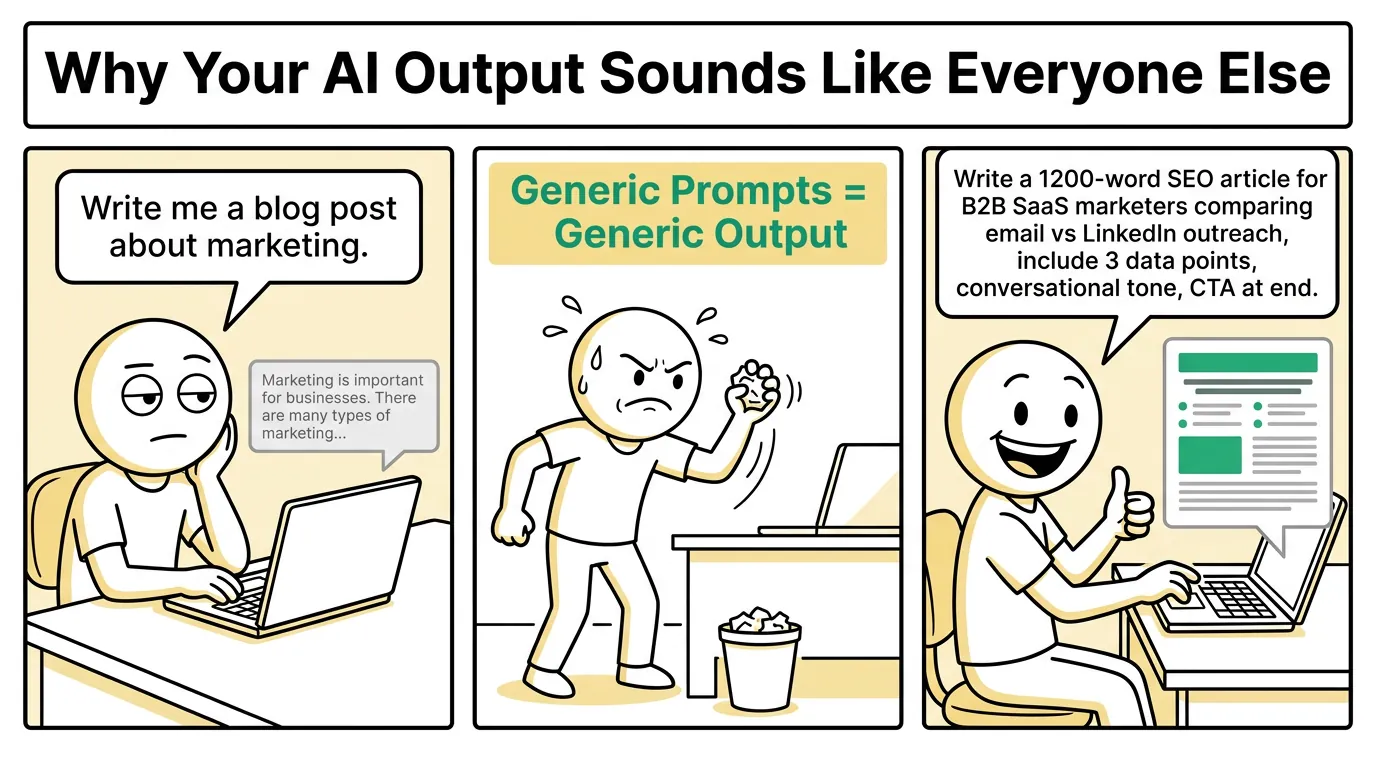
Generic prompts produce generic output. Structured prompts with competitive context produce work worth publishing. What you feed the model before asking it to write makes all the difference.

The Blog Outline Prompt That Produces 7 Differentiated H2s in One Pass
Give ChatGPT your H1, five competing SERP titles, and a contrarian angle in a single prompt. Competitive framing forces differentiation.
Without it, ChatGPT regurgitates the same structure every other article uses. The model needs to know what already exists before it can produce something different.
Output should be seven H2s, each with a one-line rationale explaining why it earns its place.
How to Batch 10 Social Captions Per Post Without Getting Repetitive Output
Specify hook type for each variation: stat, question, story, contrarian. Include your posting calendar dates in the prompt.
One session produces a full week of platform-ready captions. Grounding the prompt in actual dates forces contextual variation rather than ten slightly different versions of the same hook. Batching this way cuts social content time to under 20 minutes.
The One-Prompt Repurposing Method That Covers Three Channels Simultaneously
Paste your full blog post. Request the LinkedIn version, Instagram caption, and email newsletter summary in one prompt. No manual reformatting. No channel-switching. A brand voice system prompt carries tone across all three outputs – set it once per session and every format stays consistent.
How to Encode Your Brand Voice So ChatGPT Stops Sounding Like Everyone Else
Paste three of your best-performing posts and ask ChatGPT to identify the voice characteristics. Save that analysis as a reusable system prompt. Core limitation: you must re-prompt every new session. (This is the gap the tool comparison section addresses directly.)
ChatGPT vs Claude vs Jasper vs Perplexity – Which Tool Wins by Content Type
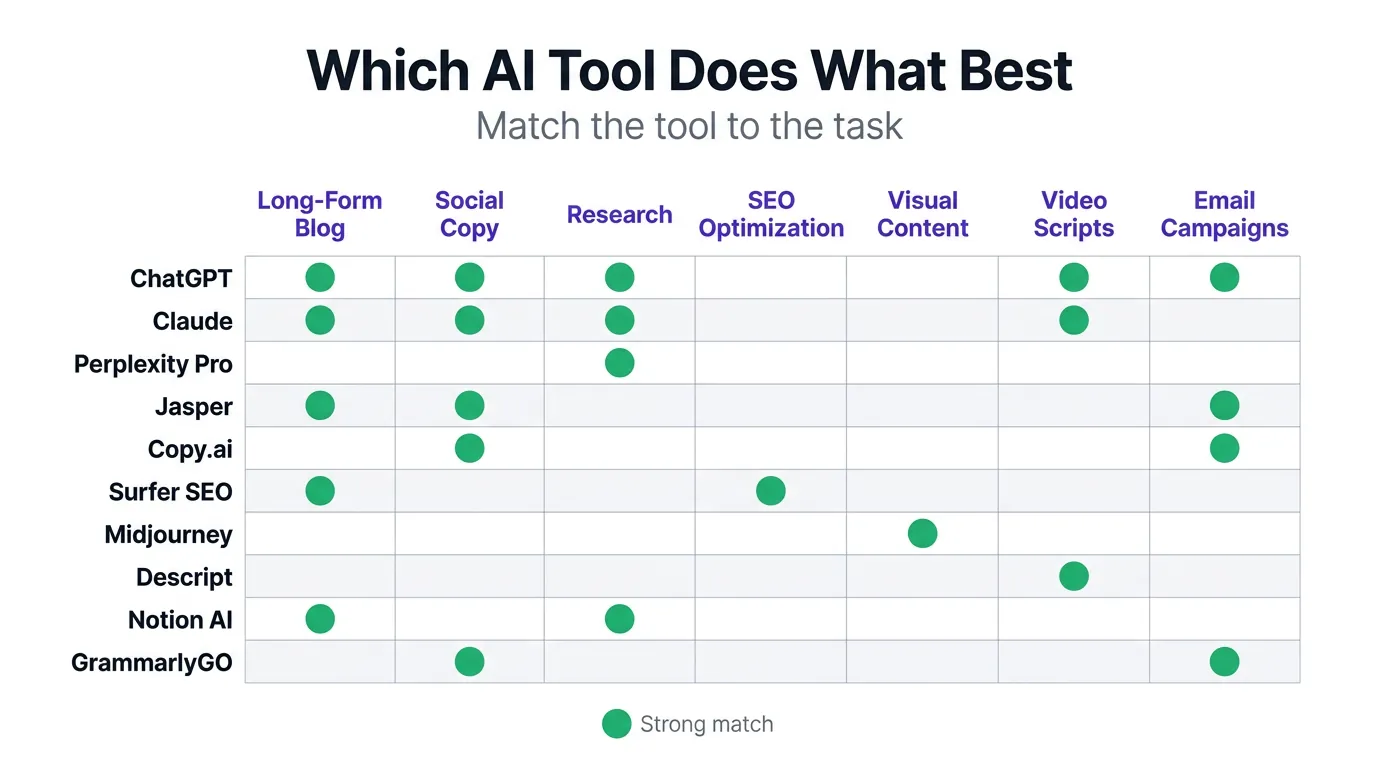
ChatGPT is the most versatile starting point. Not the winner across every category.

Why Claude Wins on Long-Form Content That Needs a Non-Obvious Angle
Claude handles longer context more coherently than GPT-4o at equivalent input length. Its instruction-following runs more literal, with fewer hallucinated additions to structured prompts. Hand Claude a detailed brief and it sticks to it.
ChatGPT improvises, and that improvisation keeps producing consensus takes rather than genuinely non-obvious angles. For thought leadership, op-eds, and nuanced long-form work, Claude is the stronger fit. Pricing shifts, so check Anthropic’s current site before budgeting.
Best fit: long-form content requiring genuine nuance.
Why Jasper Plus SurferSEO Beats ChatGPT for Search-Optimized Content
Jasper’s SurferSEO integration scores content against live SERP data while you draft. ChatGPT has no equivalent native capability. Every SEO piece built in ChatGPT demands a separate manual optimization pass (keyword density, NLP terms, SERP gap analysis), and Jasper cuts that loop entirely. Pricing starts around $49/month, but verify current rates at Jasper.ai before committing.
Best fit: agencies and small business owners producing high-volume search content.
Why Perplexity Pro Is the Only Tool That Cites Its Sources While It Writes
Perplexity Pro’s cited sources eliminate the manual fact-checking loop. Reddit thread access surfaces real audience language and live objections. Treat it as the research layer before drafting in ChatGPT or Claude, not as a standalone writing tool.
The Quick-Reference Table Every Content Team Should Bookmark
| Task | Best Tool | Why |
|---|---|---|
| Blog outlines | ChatGPT | Competitive SERP prompting |
| Long-form drafts | Claude | Coherent context, literal instruction-following |
| SEO content | Jasper + SurferSEO | Live SERP scoring during drafting |
| Social batching | ChatGPT | Hook-type variation prompting |
| Research | Perplexity Pro | Cited sources, real-time data |
| Repurposing | ChatGPT | Single-prompt multi-format output |
ChatGPT Plus runs $20/month; the Team plan is $25/user/month. Verify current pricing at openai.com.
The 8 Remaining Tools That Fill the Gaps ChatGPT and Claude Leave Open
No single tool covers everything.
Tools Built for Teams That Need Brand Voice at Scale
- Tool #5: Writesonic – High-volume content at $16+/month with 10K free words monthly. Best for budget-conscious teams needing consistent output without per-seat pricing pressure.
- Tool #6: Copy.ai – Marketing template library with workflow automation. Best for teams running repeatable campaign formats.
- Tool #7: Gemini – Strong Google Workspace integration with real-time web access. Best for teams already inside the Google ecosystem.
- Tool #8: Notion AI – Embedded directly in your docs and project management. Best for teams whose content workflow lives in Notion already.
Check current pricing at each tool’s site before committing.
- Tool #9: Rytr – Starts under $10/month – the lowest barrier to entry on this list.
- Tool #10: Anyword – Scores copy for conversion likelihood before you publish.
- Tool #11: GrammarlyGO – Handles tone adjustment and clarity editing inside your existing workflow.
- Tool #12: Otter.ai – Transcribes audio and video into structured content drafts.
Run one tool per workflow stage. Stacking five tools into a single stage creates overhead, not speed.
The One Problem Every Tool on This List Still Has
Why Every AI Draft Still Sounds Like an Algorithm Without a Dedicated Humanization Layer
Every tool on this list generates drafts. Every tool on this list requires post-editing to sound human.
That is the shared gap.
ChatGPT, Claude, and Jasper all produce content – but none applies systematic humanization at the point of generation. Post-editing eats time. For agencies managing 20 clients and solo founders with no editing support, that overhead compounds fast.
AI BrandFactory is the only option on this list that applies humanization through its 18-field Voice Profile at the point of generation, not as a post-editing step. Brand voice, tone rules, and compliance requirements get encoded once and auto-apply to every draft. For agencies and solo founders who cannot absorb editing overhead, this changes the production math.
The 30-Minute AI Content Pipeline From Topic to Publish-Ready Draft
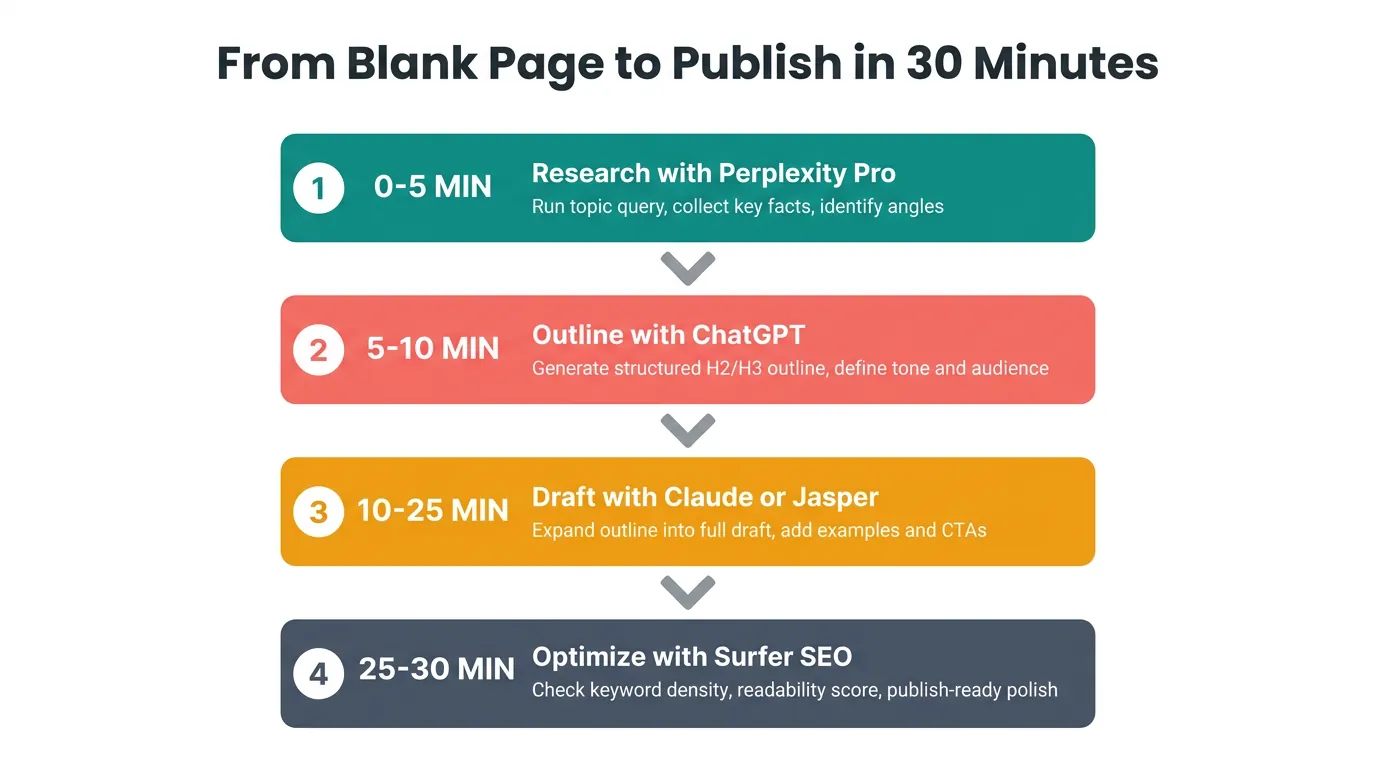
This pipeline pulls from every tool recommendation in this guide. Thirty minutes, start to finish. The sequence is not optional.
Minutes 0 to 10 – Research and Outline With the Right Tool for Each
Start with Perplexity Pro. Run your topic query, collect cited sources, give it five minutes. Then move to ChatGPT with your H1, five competing SERP titles, and a contrarian angle. Five minutes gets you a seven-H2 outline with rationale attached. You now have a sourced research brief and a differentiated outline before a single word of draft copy exists.

That’s the foundation most writers skip entirely.
Minutes 10 to 30 – Draft, Optimize, and Repurpose Without Switching Tools Twice
Writing an SEO piece? Open Jasper with SurferSEO running alongside it. Nuanced long-form? Pull up Claude with your brief already loaded. Draft in 15 minutes.
Then run the single-prompt repurposing method across LinkedIn, Instagram, and email before you close the tab.
Set aside 10 to 15 additional minutes for post-editing no matter which tool you chose. (Anyone who tells you AI eliminates editing is selling something.)
The pipeline doesn’t remove human judgment. It removes the work that doesn’t require any.
Run this once this week.
Conclusion
ChatGPT remains the sensible default for content creation, not because it dominates every category, but because it covers the widest range.
From there, bring in Claude for long-form nuance, Jasper for SEO volume, Perplexity for research, in that order. Every addition should patch a specific gap you’ve already confirmed, not one you’re merely guessing at.
Run the 30-minute pipeline once and find where it breaks down. That’s where your next tool belongs.
Ready to build your brand with AI?
One session. A full month of content. Your brand voice.
Request Private Beta Access →