How to Create Studio-Quality Infographics Without a Designer Using AI
Why Infographics Outperform Every Other Format on Pinterest
How Pinterest’s Algorithm Favors Image-Based Content for Search Longevity
Pinterest isn’t a social platform. It’s a visual search engine. Pins surface in search results for months, sometimes years, after posting. Infographics beat standard images because they carry layered, reference-worthy information.
That longevity is the whole point.
Most content marketers optimize for impressions, which is the wrong metric on Pinterest. Saves (repins) signal that a viewer found your content worth revisiting. An infographic ai generator producing branded, data-rich visuals earns saves that compound over time.Research indicates that engagement metrics on social media platforms typically decline rapidly after the first 48 hours..
Research suggests that Pinterest’s algorithm favors visual content, leading to better search visibility.. Infographics, specifically, get surfaced repeatedly because they answer questions visually.Evergreen content.
That’s what you’re actually building.
Save Rate Is the Metric That Actually Matters (Not Impressions)
A save is the highest-intent action on Pinterest. It means the viewer plans to return.
- They pack actionable data into a scannable format
- Viewers save them as reference material
- That behavior drives compounding organic reach where each save extends your infographic’s distribution
Real. Measurable. Cumulative.
The 4 Design Rules That Separate Saved Infographics from Ignored Ones
Lead With Your Most Compelling Data Point – Not Your Logo
Data hierarchy decides whether your infographic gets saved or scrolled past. Your strongest, most surprising stat belongs at the top.
Viewers scan top-to-bottom, left-to-right. Every time. Size signals importance. Color pulls the eye before layout does. If your opening element doesn’t earn attention immediately, nothing below it gets seen. Leading with your logo wastes the most valuable real estate in your entire design.
Start with the number that stops the scroll.
Why Brevity and Visual Cues Do the Heavy Lifting
A consistent brand palette makes your pins recognizable in a crowded feed. Returning viewers save familiar content faster than unfamiliar content.
Brand color also signals professionalism. Professionalism raises save and share intent. A non-designer working with an infographic maker ai tool can maintain brand consistency by locking colors in the brief before generating – no design intuition required.
Branded Color Is Not Optional – It’s How You Get Recognized
A consistent brand palette makes your pins recognizable in a crowded feed. Returning viewers save familiar content faster than unfamiliar content.
Brand color also signals professionalism. Professionalism raises save and share intent. A non-designer working with an infographic maker ai tool can maintain brand consistency by locking colors in the brief before generating – no design intuition required.
AI-Native vs Template Tools: Why Canva Isn’t Built for This
Canva works well – for people who already understand design.
Where Canva and Adobe Express Break Down for Non-Designers
Template tools assume you can identify which template suits your data. Most non-designers can’t. Picking from 400 templates without any design background creates blank canvas paralysis. Sizing elements manually demands spatial judgment that takes years to build. The tool hands you options; it doesn’t choose for you.
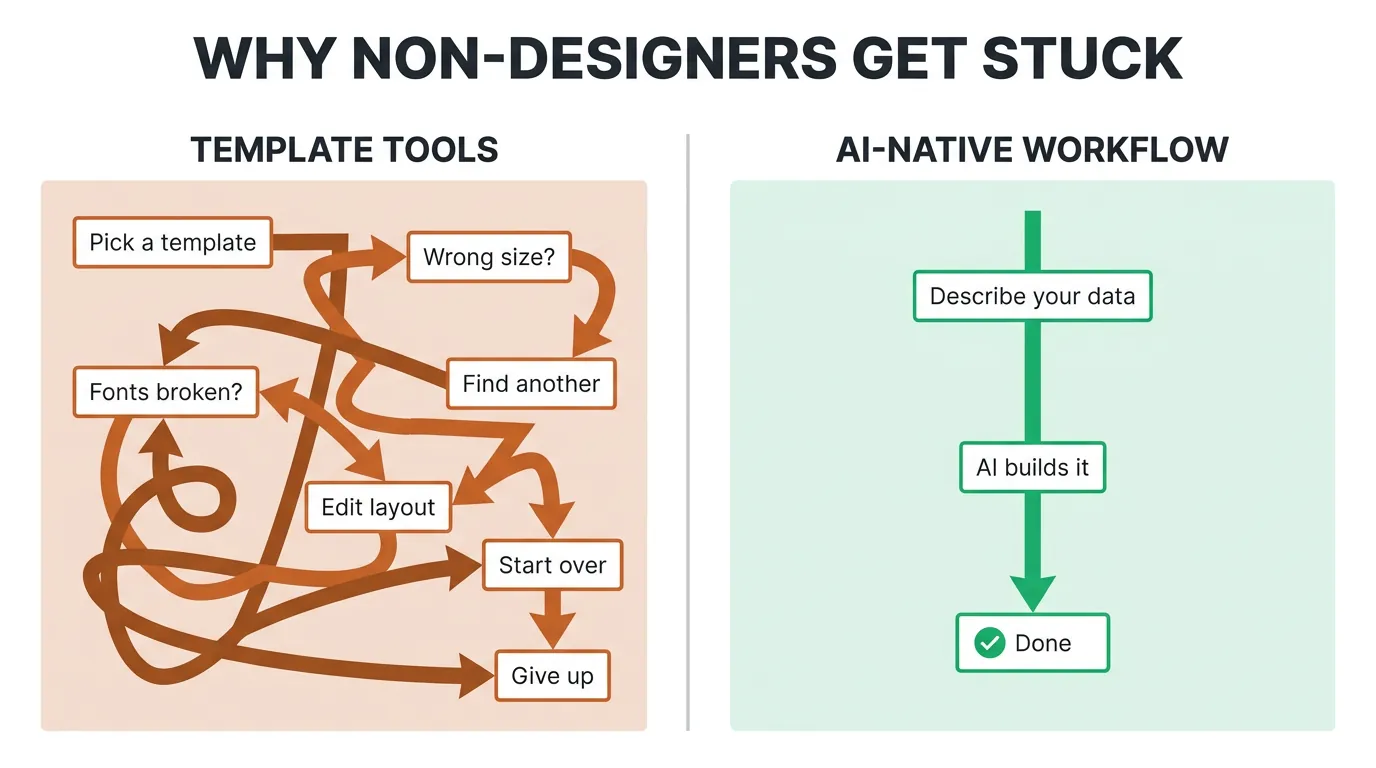

That gap is exactly where most non-designers get stuck.
What AI-Native Generation Actually Automates
AI-native tools take a brief and produce a structured layout. No design decisions required from you. Hierarchy, element sizing, visual flow – the AI handles all of it.
You might be skeptical (and fairly so), especially if you’ve tried “AI design tools” that still dropped you into a template editor. Completely valid. What’s different is that the AI generates the layout directly from your content, not from a pre-built template you have to modify.
AI BrandFactory is purpose-built for infographic creation – not a general-purpose design tool with an infographic tab buried somewhere in the menu. Built specifically for marketers without a design team, it automates exactly the decisions that stall non-designers inside template tools. You bring the data and the brief. The platform builds the infographic.
The 4-Step Workflow From Raw Data to Published Infographic
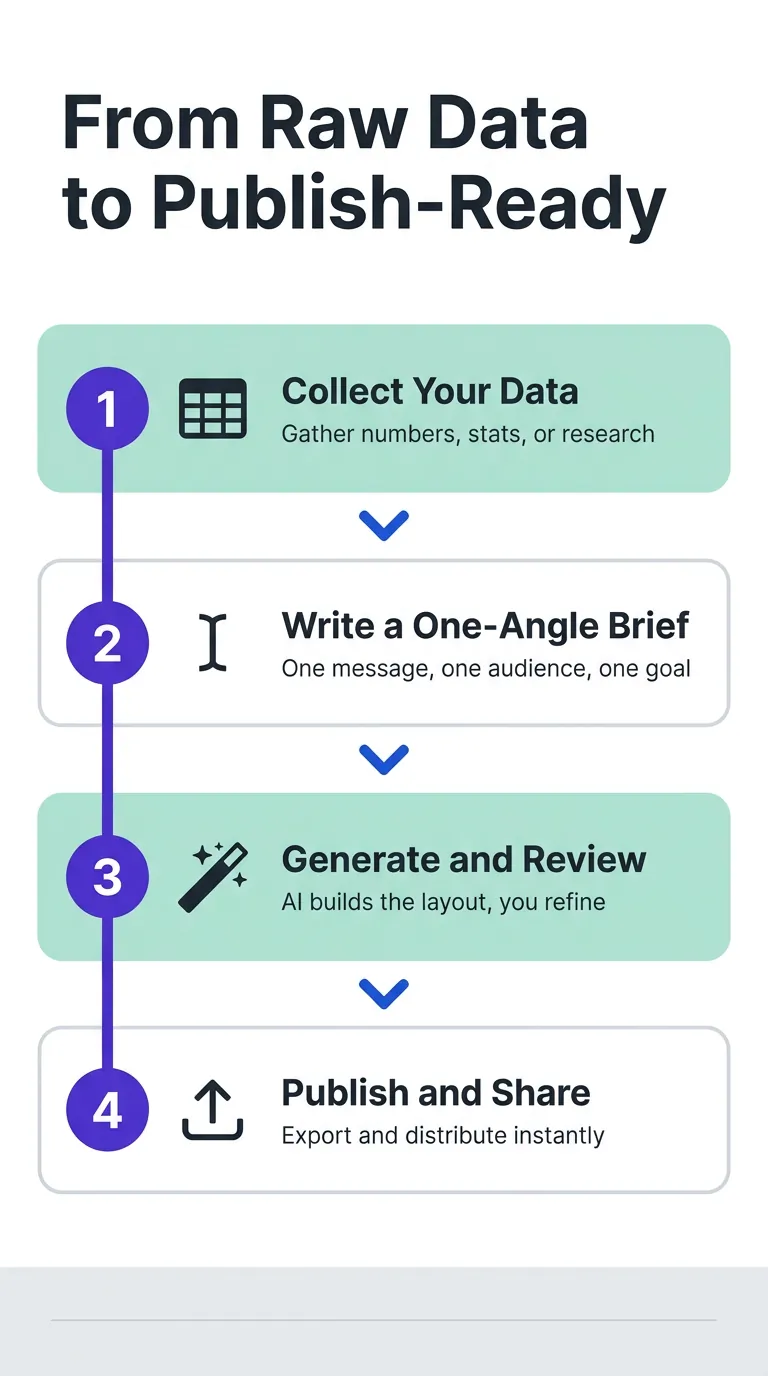
Four steps. Each one concrete.
Step 1: Collect Your Data and Pick One Clear Angle
The most common mistake is trying to cram everything into a single infographic. Before you open any tool, define the one insight your infographic actually communicates. Cap your data points at five to seven – go beyond that and scannability falls apart.
One angle. One data story. Everything else gets cut. Pick the angle your target audience cares about most, not the one that feels simplest to explain. Ruthless editing now saves you from a full redesign later.

One clear angle. Every time.
Step 2: Write a Brief That Tells the AI What to Build
A solid brief covers your topic, target audience, five to seven data points, desired tone, and brand colors. Full stop. The brief separates content strategy from design execution – you own strategy, the AI owns design. Write it in plain language, no design terminology required. The quality of what you put into that brief is the quality of what comes out.
Check AI output for data accuracy first. Layout can be tweaked. Wrong data published to the world is a different problem entirely. Verify every number against your source before you hit publish. Once accuracy is confirmed, your infographic is ready to go.
Step 3: Generate, Review, and Apply Brand Overlay
Check AI output for data accuracy first. Layout can be tweaked. Wrong data published to the world is a different problem entirely. Verify every number against your source before you hit publish. Once accuracy is confirmed, your infographic is ready to go.
Accuracy first. Always.
Conclusion
Marketers willing to use AI-native tools no longer have a designer bottleneck. Full stop.
AI BrandFactory gives you a purpose-built path from brief to published infographic, no design team required.
Ready to build your brand with AI?
One session. A full month of content. Your brand voice.
Request Private Beta Access →